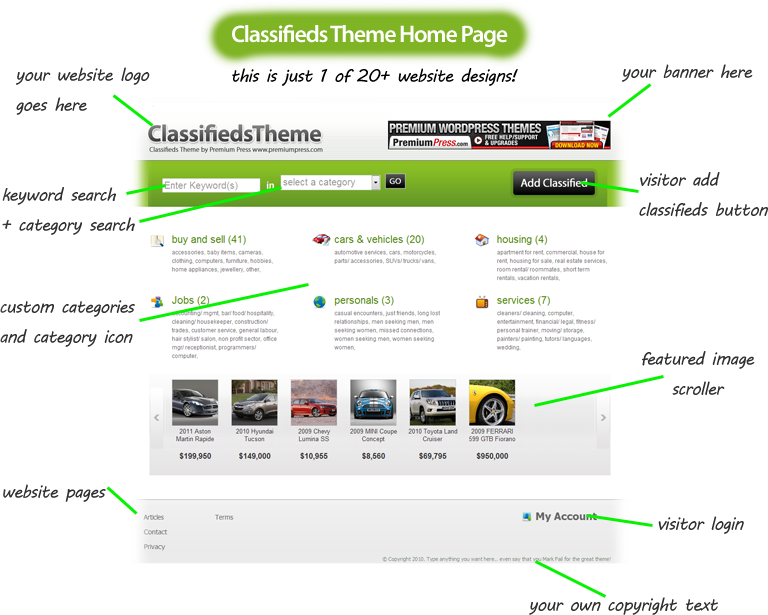
Simple and easy to use, what could be better?
The admin area of ClassifiedsTheme has been professionally designed especially with the user in mind!
You don't need a high IQ or a Degree in computing to navigate and configure ClassifiedsTheme to suit your needs.
Its simple, straight forward and easy to use!
The admin area is broken up into 9 easy sections allowing you to quickly navigate and find what you're looking for.
Take a look at some of the admin area screenshots below;

Admin Area Dashboard.
The ClassifiedsTheme admin area dashboard allows you to quickly see at a glance your website summary, order history, new submissions each month and sales totals with graphical charts.
Here you can quicly see the number of classifieds active on your website along with articles and pages.

1. General Setup
The admin area general setup page allows you to quickly configure your website information, enter your logos, copyright text, choose your designs and enter admin emails for website notification.
2. Display Setup
The admin area display setup page allows you to turn on and off many of the website features and display settings, you can choose to show/hide almost everything on the website allowing you to fully customize your website at a touch of a button.
3. Submit Listing
The submit listing page allows you to manage how website visitors submit new classifieds to your website.
Here you are able to setup and manage your website packages, you can select your own pricing for visitors to submit packages along with your own display text and terms and confitions.

4. Payment Gateways
The admin area payment gateways section allows you to quickly setup your payment options for your website, you simply enter your payment Id's such as your Paypal email and that's it ClassifiedsTheme will do all the hard work for you!

5. Order Management
The admin area orders page allows you to view and manage your website orders. ClassifiedsTheme has a built in callback system allows the system to be notified when a customer completes a payment online and updates your orders table to help you better manage paid and unpaid orders.

6. Advertising
The admin area advertising page allows you to quickly setup advertising on your website, you can simply copy/paste your banner code such as Google Adsense and it will be displayed anywhere you like either top,left,right or footer positions.

7. Analytics
The admin area analytics page allows you to insert your Google analytics code or other analytic software codeinto your website and start tracking your onlinevisitors. We even have support for Google Webmaster Tools, Adsense Tools and Google Maps!

8. Image Manager
The admin area image manage has been designed to allow you to quickly and easily manage your product images. Here you can view, edit and delete any product images on your website.
ClassifiedsTheme comes with an image editing tool allowing you to crop,rotate and resize your images for better display.
9. Import Tools
The admin area import tools allow you to take full advantage of the import features we have built into ClassifiedsTheme. These include support for Amazon, Ebay, CSV and Datafeer. Using these tools you can import thousands of products into your store in minutes!